

Setting up Sia on Synology via Docker
Very first step is to getting docker installed to your Synology NAS. Open package manager and search for docker. Click install. https://mtlynch.io/sia via docker/ Get latest rel...
Very first step is to getting docker installed to your Synology NAS. Open package manager and search for docker. Click install.
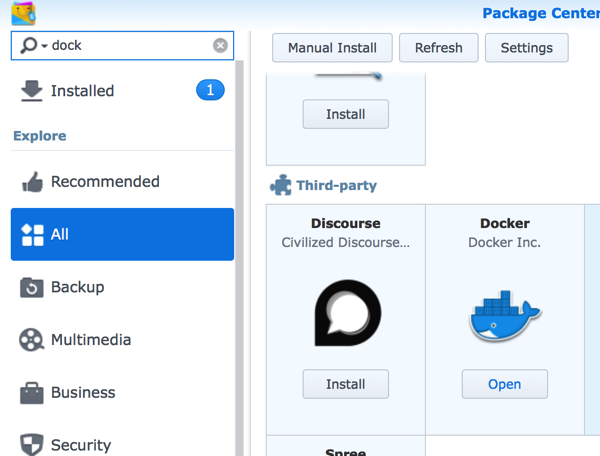
https://mtlynch.io/sia-via-docker/
Get latest release of Sia from GitHub: https://github.com/NebulousLabs/Sia/releases
Setting up SiaHost Folder
[shell]
./siac —addr 192.168.8.120:9980 host folder add /mnt/sia/host-storage 900GB [/shell]
siac wallet -h
checking the status of sia host (Below output this blockchain was being synched) [shell] AC-MBP-2:Sia-v1.3.1-darwin-amd64 test$ ./siac —addr 192.168.8.120:9980 Synced: No Height: 111530 Progress (estimated): 77.5% [/shell]

[shell] ./siac wallet -h —addr 192.168.8.120:9980 Generate a new address, send coins to another wallet, or view info about the wallet.
Units: The smallest unit of siacoins is the hasting. One siacoin is 10^24 hastings. Other supported units are: pS (pico, 10^-12 SC) nS (nano, 10^-9 SC) uS (micro, 10^-6 SC) mS (milli, 10^-3 SC) SC KS (kilo, 10^3 SC) MS (mega, 10^6 SC) GS (giga, 10^9 SC) TS (tera, 10^12 SC)
Usage: ./siac wallet [flags] ./siac wallet [command] [/shell]
Initialize the wallet at the sia host [shell] Aloks-MBP-2:Sia-v1.3.1-darwin-amd64 alokchoudhary$ ./siac wallet init —addr 192.168.8.120:9980 Recovery seed: Sia test test test test test test test test possible island test test fierce test hectare test test test test woken test test odds test violin test test test
Wallet encrypted with password: Sia test test test test test test test test possible island test test fierce test hectare test test test test woken test test odds test violin test test test [/shell] Of course about is edited version of wallet seed :) Make sure you save your recovery seed and password that only way you can recover it later.
Unlock the waller (this might take up to 20 to 20 mins. Have patience)
./siac wallet unlock —addr 192.168.8.120:9980
[shell] Aloks-MBP-2:Sia-v1.3.1-darwin-amd64 alokchoudhary$ ./siac —addr 192.168.8.120:998 Synced: Yes Block: 000000000000000caacc5c810866af66f24e6f4bf499a54282d54f28e9962329 Height: 138618 Target:
[code language=“plain”][/code]
[code language=“plain”][/code]
[code language=“plain”][/code]
This is where sia get little complex in nature. you need to understand the contracts and collaterals
Aloks-MBP-2:Sia-v1.3.1-darwin-amd64 alokchoudhary$ ./siac host —addr 192.168.8.120:9980 config collateral 1000SC Host settings updated. Estimated conversion rate: 100%
Aloks-MBP-2:Sia-v1.3.1-darwin-amd64 alokchoudhary$ ./siac host —addr 192.168.8.120:9980 config collateralbudget 1000SC Host settings updated. Estimated conversion rate: 100%
Aloks-MBP-2:Sia-v1.3.1-darwin-amd64 alokchoudhary$ ./siac host —addr 192.168.8.120:9980 config maxcollateral 1000SC Host settings updated. Estimated conversion rate: 100%
Aloks-MBP-2:Sia-v1.3.1-darwin-amd64 alokchoudhary$ ./siac host —addr 192.168.8.120:9980 config maxduration 14weeks Host settings updated. Estimated conversion rate: 100%
Check transactions of your wallet
./siac wallet —addr sia101.webhop.me:9980 transactions
Corrected pricing value Aloks-MBP-2:Sia-v1.3.1-darwin-amd64 alokchoudhary$ ./siac host —addr 192.168.8.120:9980 config maxduration 27weeks Host settings updated. Estimated conversion rate: 100% Aloks-MBP-2:Sia-v1.3.1-darwin-amd64 alokchoudhary$ ./siac host —addr 192.168.8.120:9980 config maxcollateral 100SC Host settings updated. Estimated conversion rate: 100% Aloks-MBP-2:Sia-v1.3.1-darwin-amd64 alokchoudhary$ ./siac host —addr 192.168.8.120:9980 config collateralbudget 1000SC Host settings updated. Estimated conversion rate: 100% Aloks-MBP-2:Sia-v1.3.1-darwin-amd64 alokchoudhary$ ./siac host —addr 192.168.8.120:9980 config minstorageprice 40SC Host settings updated. Estimated conversion rate: 100% Aloks-MBP-2:Sia-v1.3.1-darwin-amd64 alokchoudhary$ ./siac host —addr 192.168.8.120:9980 config minuploadbandwidthprice 30SC Host settings updated. Estimated conversion rate: 100% Aloks-MBP-2:Sia-v1.3.1-darwin-amd64 alokchoudhary$ ./siac host —addr 192.168.8.120:9980 config mindownloadbandwidthprice 60SC Host settings updated. Estimated conversion rate: 100% Aloks-MBP-2:Sia-v1.3.1-darwin-amd64 alokchoudhary$ ./siac host —addr 192.168.8.120:9980 config maxcollateral 1000SC Host settings updated. Estimated conversion rate: 100%
https://sia.tech/get-started to download the wallet (UI version wallet)
How to announce Sia host
./siac host —addr 192.168.8.120:9980 announce secure-siahost.myvnc.com:9982 Host announcement submitted to network.